CNFSimulator® · Model 01 · Airbus A320
A320 VMT
Airbus A320 Virtual Maintenance Trainer — desktop-based, classroom-ready, covering 20+ ATA systems with dual engine configuration.
Airbus A320 Virtual Maintenance Trainer — desktop-based, classroom-ready, covering 20+ ATA systems with dual engine configuration.
The Airbus A320 is the world's most widely operated single-aisle aircraft, with over 10,000 in service across more than 300 operators. Maintenance training demand for this type is correspondingly large — and the CNFSimulator® A320 VMT is purpose-built to address it. This is the most fully-featured product in the CNFSimulator® range, and the only one to support two engine variants within a single platform.
Unlike the B737 and C919 variants in the CNFSimulator® range — which each cover a single engine configuration — the A320 VMT supports both the CFM56-5B and IAE V2500-A5 variants. The instructor selects the engine type at the start of each session, and all engine-related systems, BITE procedures, and ATA 70 trial run tasks are configured accordingly. This makes the A320 VMT suitable for training centres serving operators with mixed A320 fleets.
The A320 VMT also covers the widest ATA chapter range of all three products, with dedicated task libraries for 20+ system chapters and support for all four maintenance task categories: operation, adjustment and test, removal and installation, and fault isolation.
View software modulesThe A320 VMT is the flagship product of the CNFSimulator® range. Of the three aircraft types available, it has the largest task library, the broadest ATA coverage, and the only dual-engine configuration in the product line.
The A320 VMT is the only model in the CNFSimulator® product line that supports two different engine configurations. The instructor selects the engine variant at the start of each session, and all engine-related systems, BITE procedures, and trial run tasks are configured accordingly.
The CFM56-5B is the most widely operated engine on the A320 family worldwide. The VMT provides a complete simulation of engine start, trial run, shutdown, and fault isolation procedures for this variant. All engine-related ATA 70 tasks and associated BITE diagnostic procedures are included.
The V2500-A5 is the second major engine choice for A320 operators, with a significant presence in Asian and European airline fleets. The VMT includes the full V2500 trial run task library, matching the procedural differences between this variant and the CFM56 in areas including FADEC behaviour, bleed air configuration, and engine start logic.
The A320 VMT consists of five software modules that run simultaneously and stay synchronised throughout a training session. A change made in the cockpit is immediately reflected in the dynamic schematics and the 3D aircraft model. All modules ship as standard — there are no optional add-ons.
The instructor station is the control centre for the entire training session. Installed on the instructor's PC, it connects to all student stations over the classroom LAN. The instructor selects the engine variant, assigns training tasks, and monitors student progress from a single interface.
Faults can be injected into individual or all student stations at any point during the session.
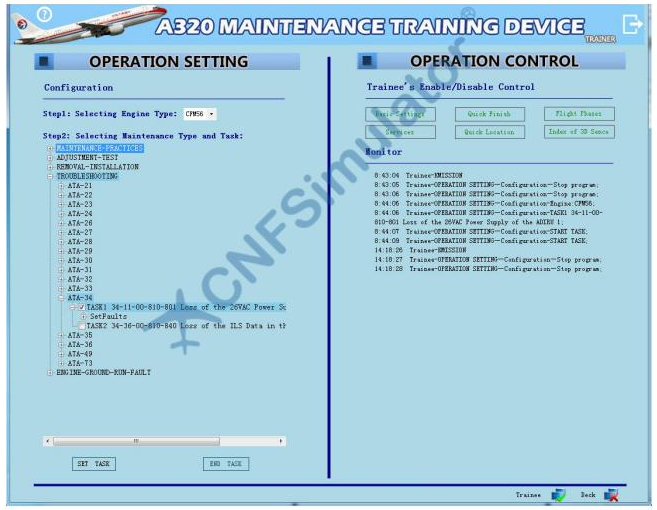
The student station is the central hub from which trainees access all other simulation modules. It receives task assignments from the instructor station and provides access to bilingual work cards, quick-access panel controls, and task history.
For guided training, step-by-step bilingual work cards walk students through each procedure with interactive prompts. For advanced training, the same interface provides access to the full AMM manual set, and the student navigates procedures independently without hints.
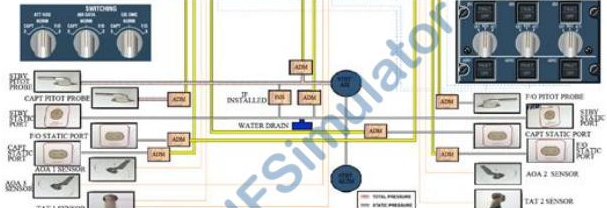
The dynamic schematic module displays all A320 aircraft systems as animated, real-time diagrams. Unlike static diagrams in textbooks, these schematics reflect the live state of the cockpit — when a student operates a switch, the corresponding schematic updates immediately to show the resulting change in system state.
The module is organised in three layers: the dynamic system logic diagram (animated system operation), the structural composition diagram (physical component layout and interfaces), and the wiring measurement diagram (circuit routing for fault isolation). All three layers are live-linked to the cockpit and 3D aircraft.
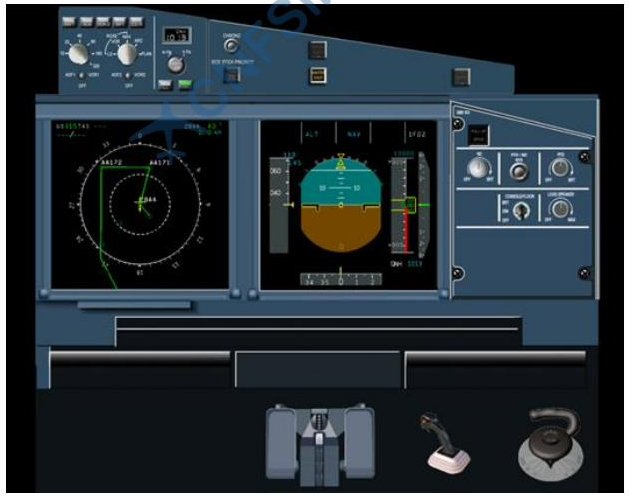
The virtual cockpit is a full 3D simulation of the complete A320 flight deck. Every panel, switch, button, indicator, and display is modelled and fully interactive. System logic is reproduced so that the cockpit responds to student inputs in the same way as the real aircraft — including ECAM warnings, system page changes, and CFDS fault code generation.
The cockpit supports both maintenance mode (ground operations, BITE testing, system checks) and flight simulation mode, which runs a complete takeoff, cruise, and landing sequence for engine trial run training tasks.
The 3D virtual aircraft module provides a complete exterior and interior model of the A320, allowing students to perform physical maintenance tasks including component removal and installation, panel opening, walkaround checks, and access to internal bays and compartments.
The integrated manual system provides access to the full set of A320 maintenance documentation within the simulator, searchable and indexed. Students can reference the correct AMM task, IPC figure, or TSM procedure without leaving the training environment.
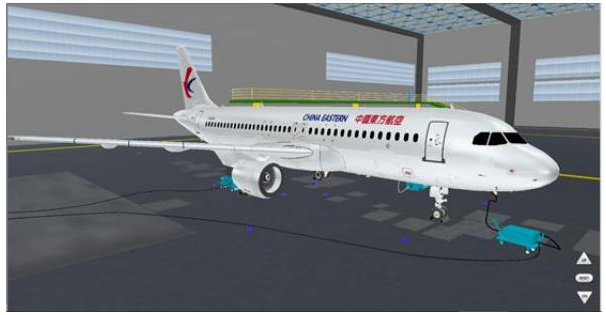
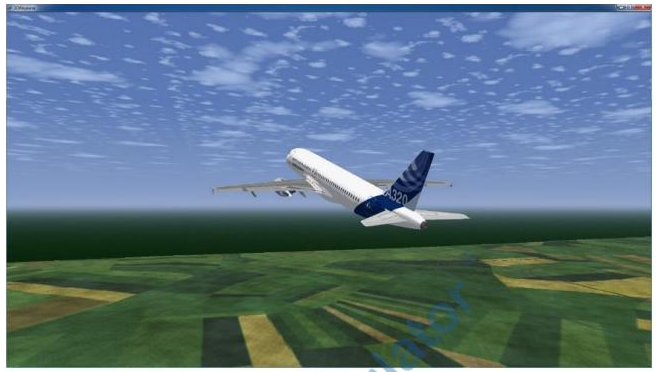
The A320 VMT covers 20+ major aircraft system chapters, structured according to the ATA iSpec 2200 numbering standard — the same chapter structure used in Airbus maintenance documentation. Each chapter supports multiple categories of training task, progressing from basic system operation through to fault isolation.
A complete fault isolation session from task assignment to completion, showing how all five modules work together in sequence.
The instructor selects the engine variant and assigns a fault isolation task — for example, a hydraulic system fault on ATA 29. The fault is injected into all student stations simultaneously. Students see an ECAM warning appear on their cockpit displays.
Before acting, students open the dynamic schematic for the hydraulic system. The affected components are highlighted in amber, matching the ECAM state. Students study the system logic and identify the probable fault location before moving to the cockpit.
Students access the MCDU CFDS page to retrieve the stored fault code. They then follow the TSM fault isolation procedure — running BITE tests, checking system pages, and cross-referencing with the integrated manual — to confirm the fault and identify the affected component.
Once the fault is isolated, students switch to the 3D aircraft module to locate and access the faulty component. They follow the removal and installation procedure, selecting the correct tools and parts from the virtual stores, and perform the replacement.
After the component replacement, students return to the cockpit to perform the post-maintenance BITE test. When the test passes and the ECAM clears, the task is marked complete. All steps taken throughout the session are logged automatically.
The instructor reviews each student's session log on the monitoring screen — including step sequence, time taken, and any procedural deviations. A debrief session can then be conducted with the full class based on the recorded results.
The A320 VMT is in active use across three primary user groups, each with different training objectives but sharing the same platform.
The A320 VMT supports undergraduate and postgraduate aviation maintenance engineering programmes. It provides the practical simulation component that complements classroom theory, allowing students to develop hands-on skills in a controlled environment before accessing real aircraft on placement.
For FAA Part 147 and EASA Part 147 approved maintenance training organisations, the A320 VMT provides the practical training component for A320 type-rating courses. It supports the hands-on element of maintenance licence training without requiring scheduled access to an A320 aircraft or part-task trainer.
Airlines and MRO operators use the A320 VMT for new hire type familiarisation, recurrent training, and fault isolation skill maintenance. It reduces the need for aircraft access during training periods and allows fault scenarios to be practised that would be impractical or unsafe to replicate on a line aircraft.
Contact our team for a live demonstration, technical consultation, or pricing information. We also offer on-site installation and initial instructor training as part of the deployment package.